
At the start
We agree on integrations, products, packing methods and fulfilment rules. The Labran team helps prepare the connections and your panel access.
Our team designs and develops Labran WMS in-house. It connects orders, warehouse stock, shipments and returns. We adapt its features and integrations to our clients' needs, while our own AI agent helps you work with data through chat.
The panel gives you visibility into warehouse operations and a place to share information. Your work focuses on stock deliveries, monitoring orders and situations that need a decision.
We agree on integrations, products, packing methods and fulfilment rules. The Labran team helps prepare the connections and your panel access.
Announce what you are sending and in what quantities. After receipt, check stock and any discrepancies.
Monitor fulfilment and available stock. When an order needs review or a return arrives, provide the information needed.
Once integrations are configured, orders enter the WMS automatically according to the agreed rules. Statuses and tracking numbers return to the connected sales channels.
Choose a situation. See what you check in the panel, how the system supports you and what the warehouse does.
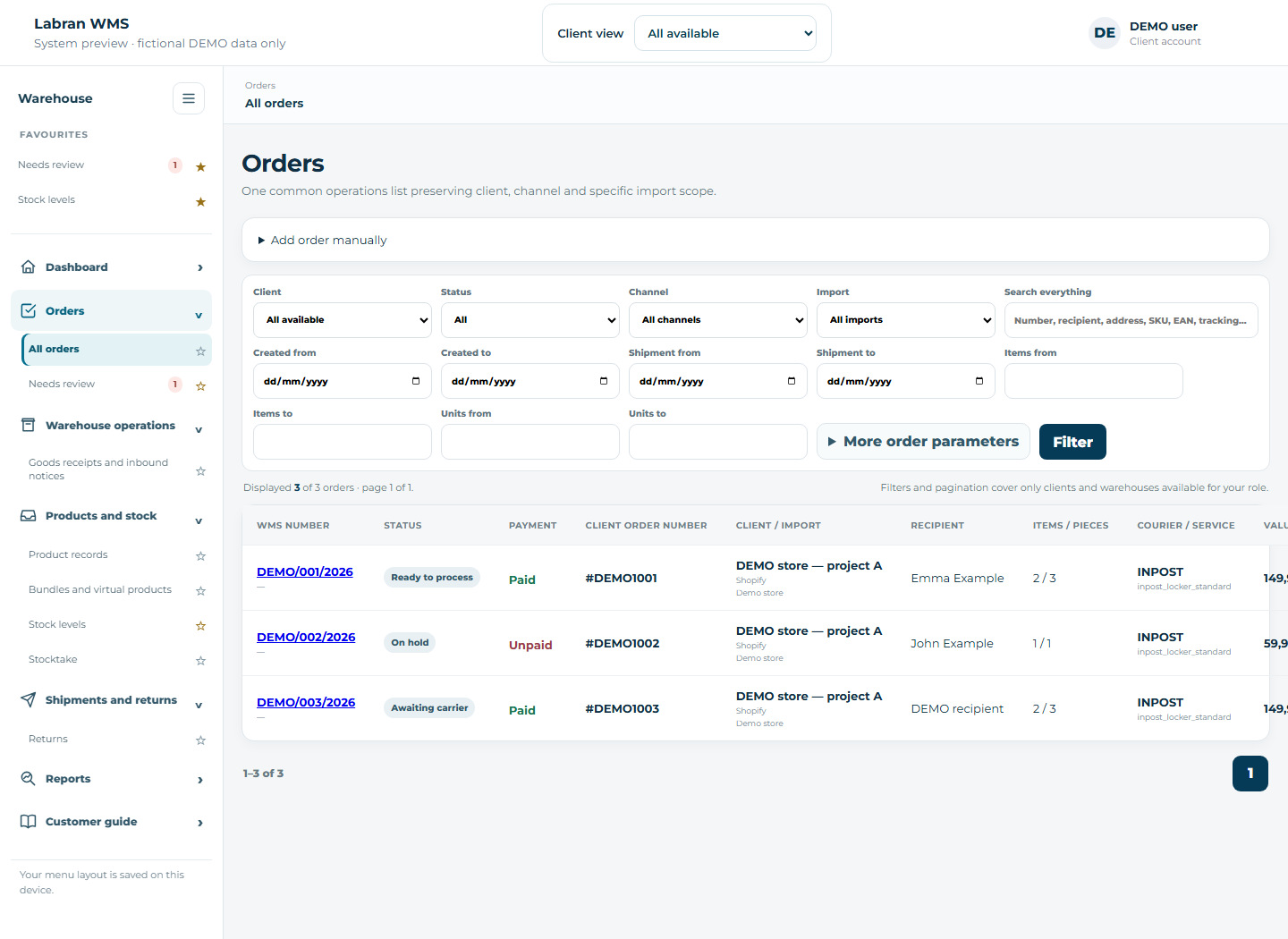
See orders from your sales channels, their payment status and fulfilment progress in one place.
Check the status. If a correction is needed, update the information before the warehouse starts work.
Imports orders according to the integration settings and checks the information needed for fulfilment.
Picks the products, packs them and prepares the shipment for collection by the carrier.
Actual WMS screen · demonstration data
Change products and quantities before fulfilment starts. Agree later corrections with the warehouse.
If stock, address details or delivery information are missing, you can see why an order has been held.
Read the message and provide the missing information or contact your account manager.
Identifies what needs checking and verifies the saved information again.
Clarifies warehouse issues and handles the next steps, such as retrying a shipment after a carrier error.
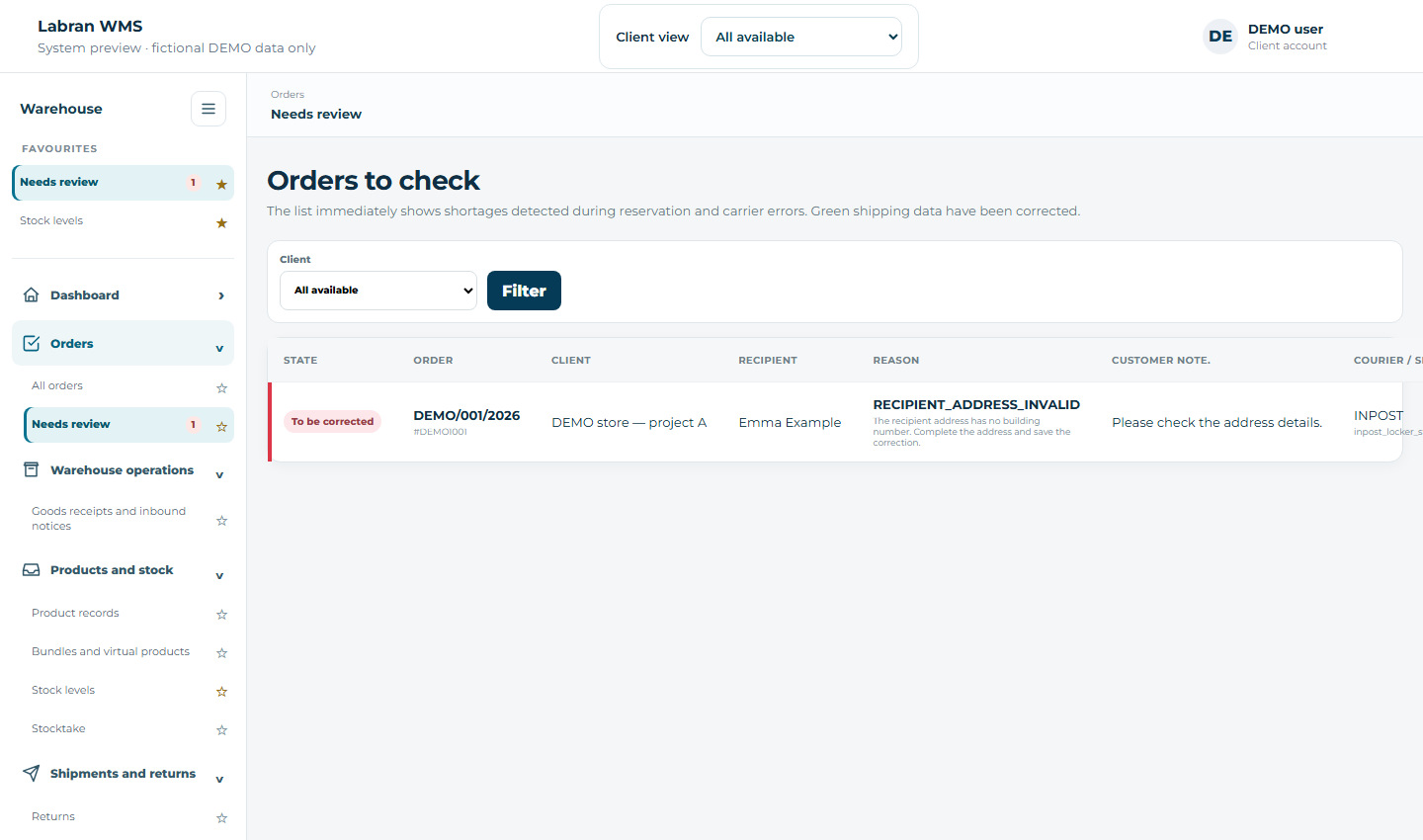
Actual WMS screen · demonstration data
Payment and fulfilment statuses are separate. An order must only be marked as paid after payment is confirmed.
An inbound notice announces a delivery with a list of products and quantities. Enter it in the panel or import its lines from Excel.
Declare the products, quantities and delivery details, then submit the completed notice to the warehouse queue.
Passes the notice to the queue and shows how much stock has been received.
Receives the delivery, counts the products and records any discrepancies.
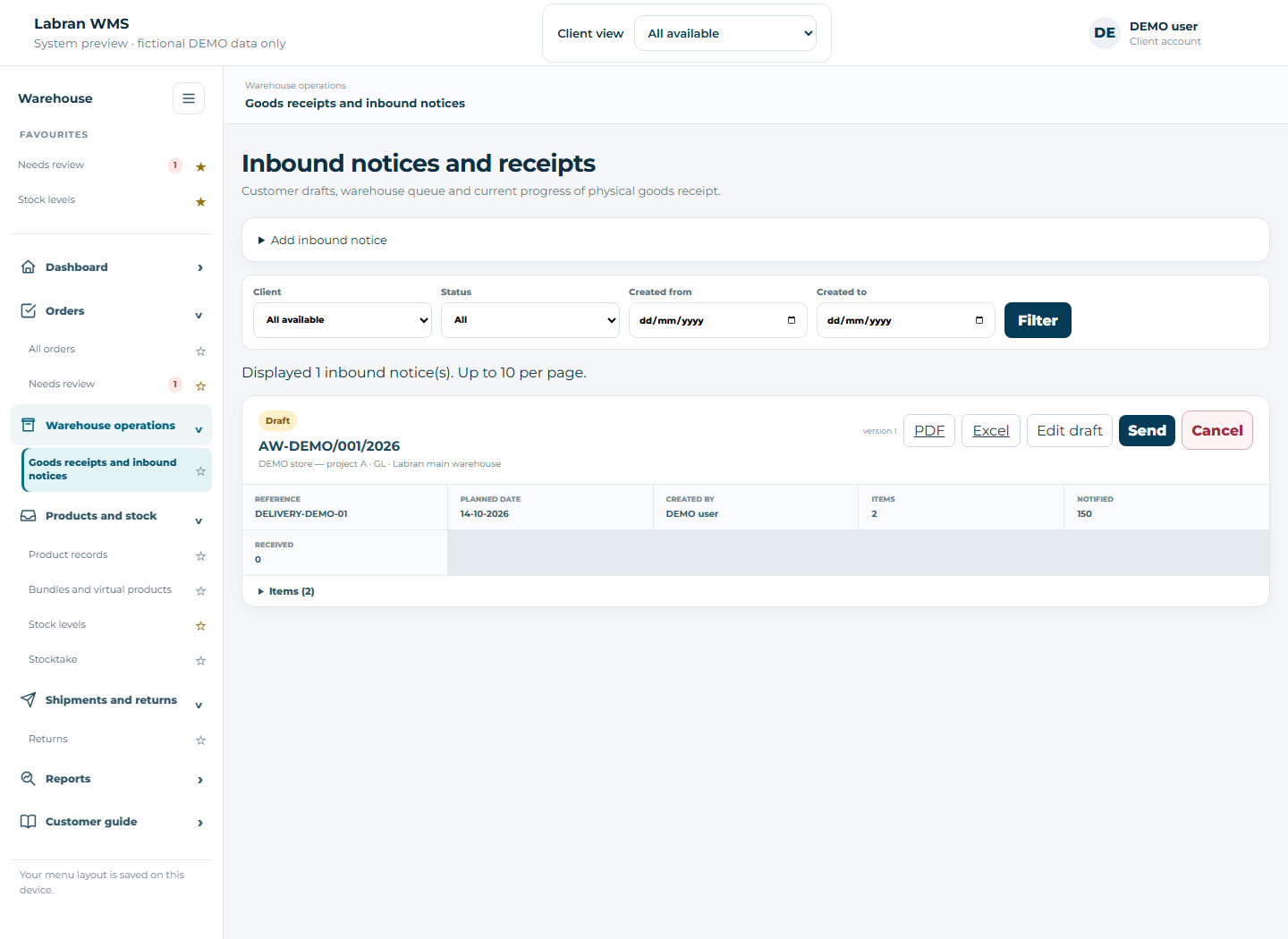
Actual WMS screen · demonstration data
Submitting a notice does not increase stock. Stock appears after the warehouse receives the goods.
Distinguish physical stock, quantities reserved for orders and available quantities. You can also check product locations.
Monitor available stock and plan your next delivery. Arrange a stocktake when needed.
Displays stock and reservations. With synchronisation configured, it sends availability to sales channels.
Receives, moves and dispatches goods, and performs the agreed stocktake.
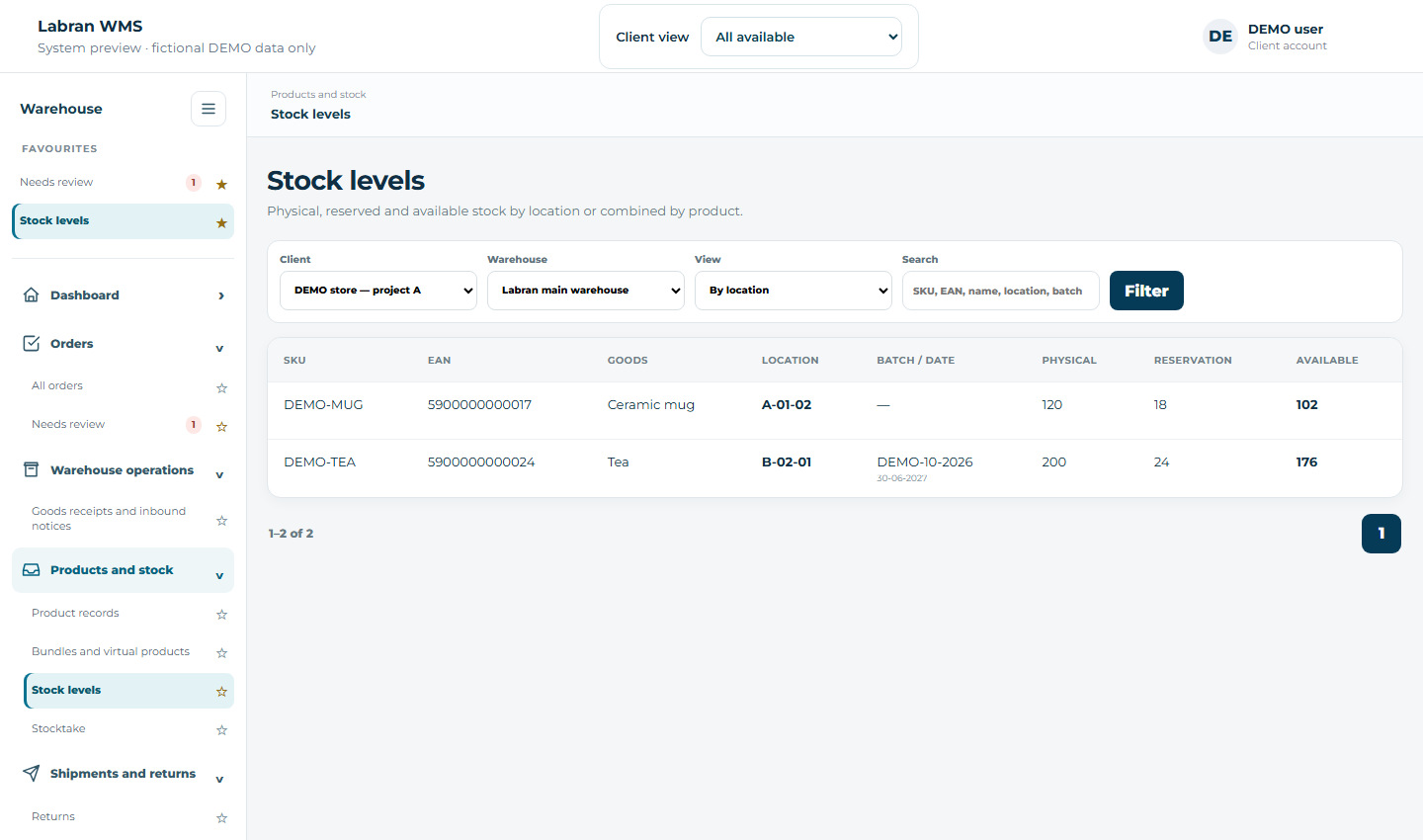
Actual WMS screen · demonstration data
A bundle sold as one line may contain several warehouse products. Define its rule in the panel.
Specify the bundle SKU and its components. For a line without physical goods, you can set a virtual product rule.
Breaks the bundle into components for fulfilment. Virtual lines are excluded from picking and packing.
Picks physical products according to the agreed bundle contents.
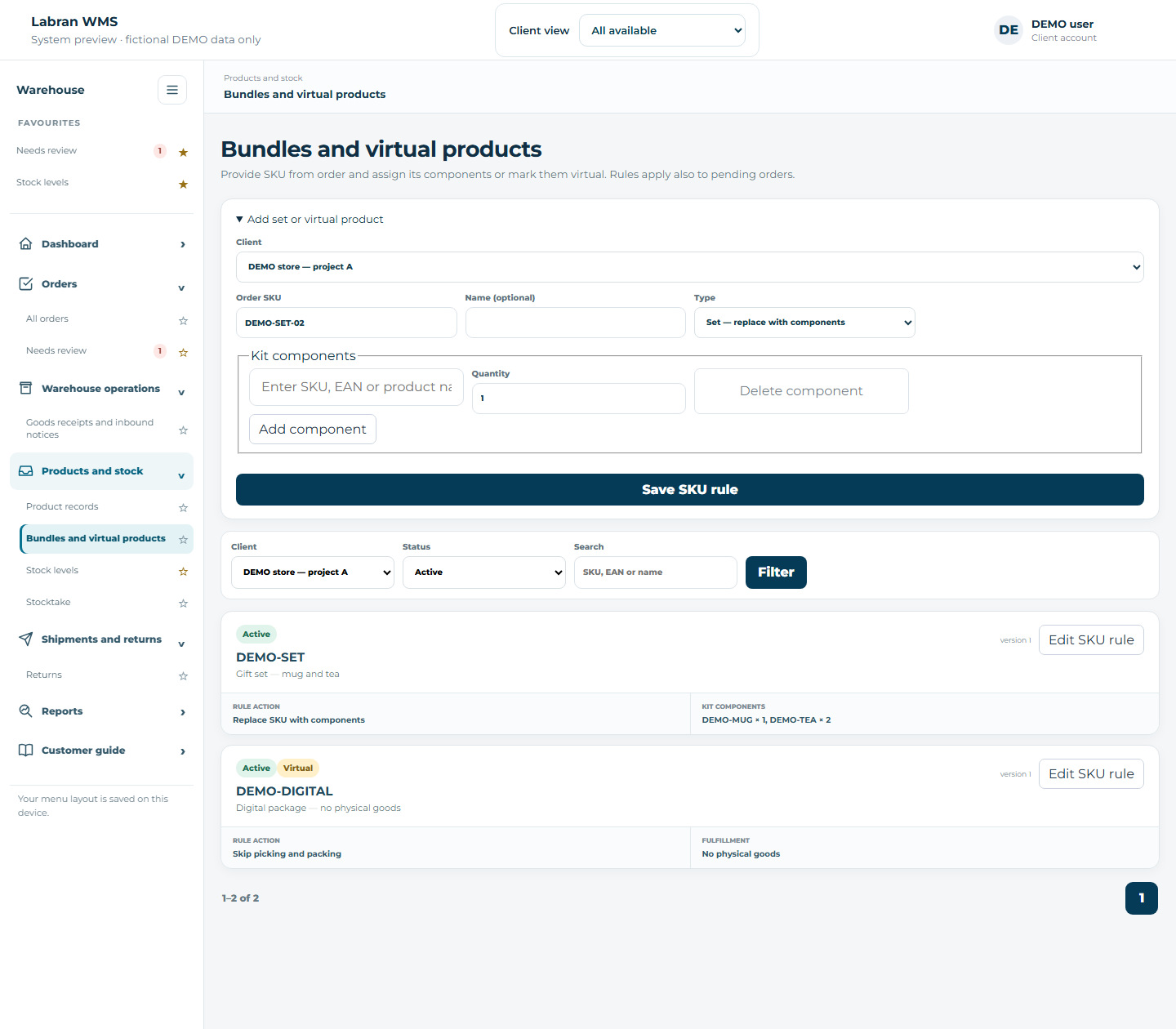
Actual WMS screen · demonstration data
A bundle consumes its components' stock. Use a virtual product only for a line with no physical goods to dispatch.
Check current returns, their processing stage and the quantities expected, received and inspected.
Review returns and agree with your account manager what should happen to the goods next.
Links return information to the order and displays processing progress.
Receives the return, checks the products and follows the agreed instructions.
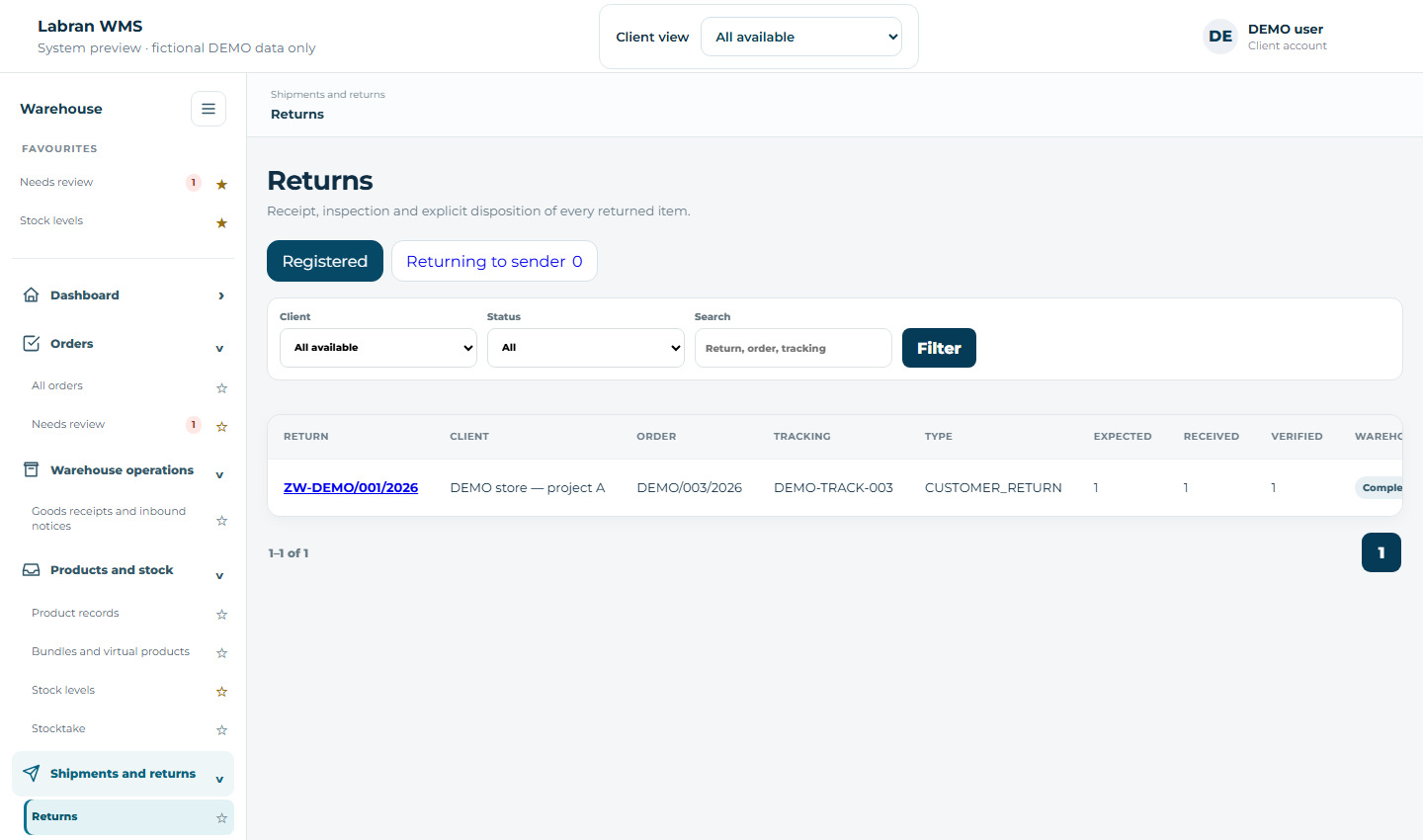
Actual WMS screen · demonstration data
The carrier status ‘Return to sender’ does not mean the goods have already been physically received by the warehouse.
The client API lets you automate work with orders, products and inbound notices, and read stock, returns and fulfilment progress. You use the data and actions available to your account.
Connect your own application via API, or connect the Labran MCP application to your AI assistant that supports remote MCP.
Checks permissions on every request. Changes prepared through API or AI require confirmation and leave an audit trail.
Handles receiving, picking and shipping. Your team can manage its part of the process using the tools it already uses.
Automation from your application
An AI application supporting remote MCP
Orders · products · inbound notices · stock · returns
Check available stock. Find an order. Prepare an inbound notice.
One connection can cover a single project or all clients available to your account. You can revoke access at any time.
Access tokens, connection instructions and PDF documentation after signing in.
Automate panel user actions. The Labran team sets up store and carrier integrations with WMS.
The warehouse handles the physical work. The panel shows you progress, and you respond when additional information or a decision is needed.
The order appears in ‘To review’ with a description of the issue. Your team and Labran account manager have a starting point for resolving it.
The system is designed and developed by the Labran team, which knows our warehouse processes. We can adapt integrations, fields and processing rules to your business. Agreed changes and implementations are included in our cooperation.
The agent helps you check orders, analyse data and use available system functions through chat. It works within the user's permissions. The warehouse handles physical goods receipt, picking and packing.
With a sales channel connected, imports follow the agreed configuration. Manual entry is available when you need an order outside an integration.
Before warehouse work starts, you can correct information and products. Change products and quantities before export and fulfilment. Agree later corrections with the warehouse; address editing also depends on whether the parcel has already been dispatched.
An inbound notice announces a delivery. Stock increases after the warehouse physically receives the goods. The panel lets you compare declared and received quantities.
Yes. Labran grants accounts access to the relevant clients and projects. Users see only the data covered by their access and can switch between assigned projects.
We welcome ideas from our clients. Individual changes and integration adjustments are included in our cooperation, with no additional implementation charge for agreed changes.
We adapt data exchanges, fields and processing rules to your tools, including cases where a standard integration is not enough.
You work directly with the team developing the system. Together, we define the scope, test the solution and introduce it into your workflow.
Even complex integrations and data exchanges can be prepared in as little as a week. We confirm the schedule after reviewing the scope and API availability.
Ask the agent about orders, stock and fulfilment progress. Use chat to analyse data and access available WMS functions within your account's permissions. We develop the agent alongside our system and warehouse processes.
Keep access to information about orders and warehouse operations when you are away from the office.
The panel is available in Polish, English, German, Chinese, Ukrainian, Estonian, Lithuanian, Russian and Greek. We welcome international businesses, and their teams can work in their chosen language.
Labran WMS is an operating panel used to handle stock, orders, shipments, returns and integrations. The view below is for demonstration purposes only.
Import and execution queues.
Inventory and location visibility.
Pick & Pack process control.
Labels, statuses and tracking.
Registration and further instructions.
Operational data in one place.
API/EDI and sales channels.
The WMS connects sales channels with warehouse operations. Orders are imported automatically, the system monitors inventory and workflows, and order status and tracking details are sent back to the online shop or marketplace.
Orders from multiple sales channels are collected automatically and handled in one process.
The store customer receives up-to-date information about the implementation, and the e-commerce team does not have to manually update each marketplace.
Selling a product in one channel updates availability in other connected channels and reduces the risk of overselling.
Before a parcel is sealed, the system checks the product again to support picking accuracy.
Batch shipment processing and standardised workflows support product launches, pre-orders and large order volumes.
The returned product can be linked to the original order, described and sent for resale or further processing.
The system supports automatic courier labels and the generation and transmission of commercial documents.
We combine the marketplace, WMS, warehouse and delivery network into one clear process.

Orders are automatically sent to WMS. We synchronize stock, execution, statuses and tracking numbers.

We send orders to foreign markets using the Spring network. This solution is particularly beneficial for light e-commerce products, because in the range of rates available through Labran, the settlement is based on the actual weight of the shipment, not the dimensional weight.
Spring connects the shipment to a local last mile operator in the destination country. Thanks to this, the store uses one shipping process and consistent tracking, and the recipient receives the parcel through a network known on its market. Tracked variants, with delivery confirmation, delivery to a point or vending machine, as well as economical solutions for light shipments are available.
Ask about shipping with Spring GDSFor Spring services and rates available through Labran, billing is based on actual weight. Detailed size and weight limits depend on the country and the selected service option.
The order flows through one structured process, and the status and tracking are returned to the sales channel.
Orders from different channels flow into one operational flow. Fulfillment statuses, tracking and data updates return to the sales channel.




The system imports orders, updates order statuses and inventory, supports picking and checks packing accuracy.







Automatic flow of orders and statuses reduces data rewriting and speeds up response.
Integration architecture allows you to combine sales, ERP and the warehouse process.
Operational events can transmit current status to the store and customer systems.
User roles and structured flow help protect access to operational data.

Leave your basic details. Our sales specialist will call you, learn the scale of your operation and prepare the next steps.